Understanding Server Name Indication (SNI) in TLS
Comprehensive guide to Server Name Indication (SNI), its role in TLS handshakes, packet analysis with Wireshark, and modern encryption improvements with ECH.
Introduction
Server Name Indication (SNI) is a crucial extension to the Transport Layer Security (TLS) protocol that enables multiple HTTPS websites to be hosted on a single IP address and port. Understanding SNI is essential for network engineers, security professionals, and anyone working with modern web infrastructure.
This guide explores how SNI works, how to capture and analyze it using Wireshark, and the privacy implications that led to Encrypted ClientHello (ECH).
What is Server Name Indication?
Server Name Indication (SNI) is a TLS extension defined in RFC 6066 that allows a client to specify which hostname it's attempting to connect to during the initial stages of the TLS handshake. This enables a server to present the correct SSL/TLS certificate for the requested domain, even when multiple domains share the same IP address.
The Problem SNI Solves
Before SNI, each SSL/TLS certificate required its own dedicated IP address. This created several issues:
- IPv4 Address Exhaustion - Limited IPv4 addresses made hosting multiple HTTPS sites expensive
- Infrastructure Complexity - Required multiple IP addresses or complex proxy configurations
- Virtual Hosting Limitations - Made name-based virtual hosting impossible for HTTPS
SNI solved these problems by allowing clients to indicate the target hostname before the TLS handshake completes.
How SNI Works in TLS Handshakes
TLS Handshake Process
The SNI extension is transmitted as part of the ClientHello message during the TLS handshake:
- Client Sends ClientHello - The client initiates the connection by sending a ClientHello message
- SNI Extension Included - The ClientHello includes the SNI extension containing the target hostname
- Server Selects Certificate - The server reads the SNI value and selects the appropriate certificate
- ServerHello Response - The server responds with the correct certificate for the requested domain
- Handshake Completion - The TLS handshake continues normally with the selected certificate
ClientHello Message Structure
The ClientHello message contains:
- Supported TLS versions
- Cipher suite preferences
- Compression methods
- SNI Extension - The target hostname in plain text
Analyzing SNI with Wireshark
Capturing TLS Handshakes
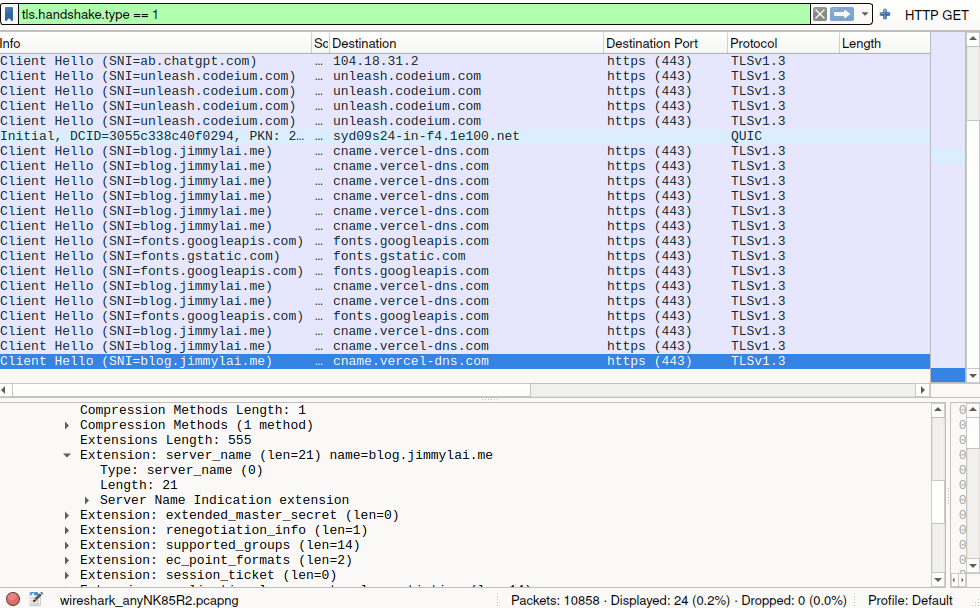
To capture and analyze SNI using Wireshark, follow these steps:
1. Apply the ClientHello Filter
Use this display filter to show only ClientHello messages:
tls.handshake.type == 1This filter isolates the initial client handshake messages where SNI is transmitted.
2. Locate the SNI Extension
Within the captured ClientHello packet:
- Expand the "Transport Layer Security" section
- Navigate to "Handshake Protocol: Client Hello"
- Find "Extension: server_name"
- View the "Server Name" field containing the hostname
3. Extract the Hostname
The SNI field displays the exact hostname the client requested, such as:
Server Name: www.example.com
Practical Use Cases
Network administrators use SNI analysis for:
- Troubleshooting HTTPS connections - Verify correct hostname resolution
- Security monitoring - Identify which services clients are accessing
- Certificate validation - Ensure servers present correct certificates
- Traffic analysis - Understand application-layer communication patterns
Privacy Implications of SNI
The Privacy Problem
While SNI enables efficient HTTPS hosting, it creates a privacy concern:
SNI is transmitted in plain text, revealing:
- Which websites users are visiting
- Specific services being accessed
- Hostname information before encryption begins
Even though the content of HTTPS connections is encrypted, the SNI field exposes the destination hostname to anyone monitoring network traffic, including:
- Internet Service Providers (ISPs)
- Network administrators
- Man-in-the-middle attackers
- Government surveillance systems
Censorship and Filtering
Because SNI is visible in plain text, it enables:
- Domain-based filtering - Blocking specific websites by hostname
- Selective censorship - Preventing access to particular services
- Traffic discrimination - Treating different services differently based on hostname
Evolution: From ESNI to Encrypted ClientHello (ECH)
Encrypted Server Name Indication (ESNI)
The first solution was Encrypted SNI (ESNI), which encrypted the hostname field in the ClientHello message. However, ESNI had limitations:
- Only encrypted the SNI field
- Left other ClientHello parameters exposed
- Required complex DNS infrastructure
Encrypted ClientHello (ECH)
Encrypted ClientHello (ECH) is the successor to ESNI, providing comprehensive protection:
Key Improvements:
- Full ClientHello Encryption - Encrypts the entire ClientHello message, not just SNI
- Enhanced Privacy - Protects all handshake parameters from observation
- DNS Integration - Works with DNS HTTPS resource records for key distribution
- Forward Secrecy - Ensures past connections remain secure
How ECH Works:
- Client retrieves ECH configuration from DNS (via HTTPS records)
- Client encrypts ClientHello using server's public key
- Encrypted ClientHello is wrapped in an outer ClientHello
- Server decrypts the inner ClientHello and continues handshake normally
ECH Specification
ECH is defined in the IETF draft specification:
Browser and Server Support
As of 2024, ECH support is growing:
- Firefox - Enabled by default in recent versions
- Chrome/Chromium - Available behind experimental flags
- CloudFlare - Supports ECH on their CDN
- OpenSSL - Experimental support in development
Lessons Learned
SNI Deployment Considerations
When deploying services that rely on SNI:
- Legacy Client Support - Very old clients (pre-2010) may not support SNI
- Load Balancer Configuration - Ensure load balancers properly handle SNI
- Certificate Management - Automate certificate selection based on SNI values
- Monitoring - Implement SNI-aware monitoring for proper certificate serving
Privacy Best Practices
For privacy-conscious deployments:
- Deploy ECH - Implement ECH when available to protect user privacy
- Use DNS over HTTPS (DoH) - Prevents DNS queries from revealing hostnames
- Monitor SNI Exposure - Understand what information is visible in your network
- Educate Users - Help users understand TLS privacy implications
Security Implications
SNI visibility enables both legitimate and illegitimate use cases:
Legitimate:
- Network security monitoring
- Compliance and policy enforcement
- Performance optimization
Concerning:
- Surveillance and tracking
- Censorship and filtering
- Privacy invasion
Understanding these trade-offs is essential for network engineers and security professionals making architectural decisions.
Conclusion
Server Name Indication has been instrumental in enabling the modern HTTPS-enabled web by allowing multiple secure websites to share IP addresses. However, the privacy implications of transmitting hostnames in plain text have driven the development of Encrypted ClientHello (ECH).
As ECH adoption increases, the balance between operational visibility and user privacy continues to evolve. Network professionals must stay informed about these developments to make appropriate architectural and policy decisions.